 RedactPDFKit
For preparing a sharing copy of a statement. Ask the recipient which fields they require before deciding what to remove.
Before you start
- The recipient’s requirements for visible information.
- An unchanged original kept separately.
- Account numbers and contact details to locate on every page.
Try 10 pages with Google sign-in, or compare the monthly plans.
Agree what must remain visible
The right redaction depends on why you are sending the statement. A recipient may need your name, statement period, balance or particular transactions to check the document. Ask before hiding fields they rely on.
Make two lists: information they need and information they do not need. Do not change amounts, dates or transaction descriptions to make the document say something different. A sharing copy should clearly show where information has been removed.
Find repeated account and contact details
Account numbers can appear in a header on every page, not just in the account summary. Review postal addresses, phone numbers, email addresses and references in transaction descriptions too.
If the recipient permits only the last four account digits to remain, inspect the layout before drawing the mask. Do not assume keyword matching will leave part of a number visible: the selection can cover the whole recognized word. Use and review a manual region for a partial-number mask.
Enter exact strings, then inspect the matches
Add the exact numbers or phrases you want covered under Custom keywords. A number printed with spaces or hyphens may need a separate entry. The product does not promise a bank-specific detector for every account or routing number.
Open each processed page and compare the original with the result. Keep any selection that crosses into a required amount or date. Draw manual boxes over missed details and check that every digit intended for removal is inside the box.
Your statement is a scan? Use OCR and review the page images.
Try the fictional practice statement first
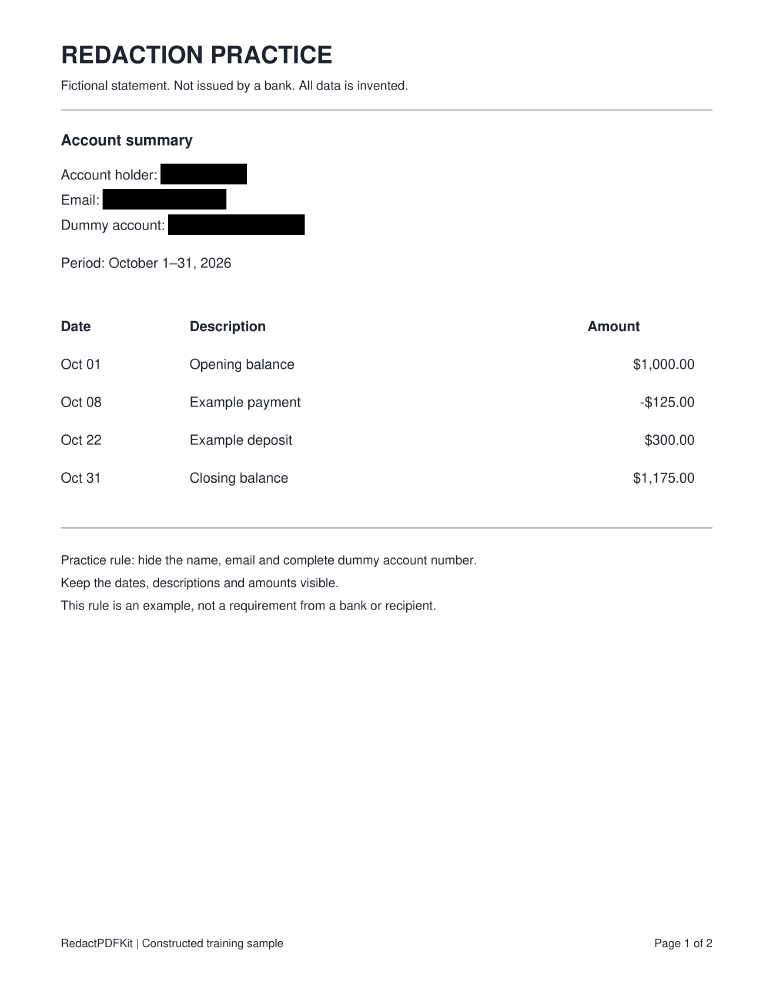
The practice file below contains a fictional name, example email address and dummy account number. Its two pages deliberately repeat the identifying fields in different positions. The companion redacted file was created using the application’s keyword matching and PDF export code.
The sample hides the name, email and complete dummy account number while leaving dates, descriptions and balances visible. It demonstrates one chosen remove/keep list, not what your recipient will accept. No live bank document or account data is used.
Download and inspect the sharing copy
Choose PDF output, run the output check and download the result. Review every page at a readable zoom: check that required amounts and dates remain legible, and that the intended identifiers are covered.
The export contains page images rather than the original searchable text, forms or attachments. If the recipient requires a digitally signed original, selectable data or an unedited statement, ask what they will accept before sending this version. Delete the stored task from your workspace when you no longer need it; there is no automatic expiry.
Before you attach it to an email, run through the saved-file checklist.
Practice files and checklist
Use these fictional examples before working with your own documents.
Common questions
Can I leave the last four digits visible?
You can position a manual mask over only the digits to remove. Check the actual exported image; keyword selections may cover the complete number.
Will a landlord, lender or other recipient accept it?
Acceptance depends on the recipient. Confirm their requirements first; this tool does not verify that a redacted statement meets them.
Does the example prove automatic account-number detection?
No. It uses an explicit keyword list. It tests those matches and the export path, not automatic financial-field recognition or OCR accuracy.
Prepare your redacted copy
Choose your rules, review the result and download a checked file.
Open Upload & rules